
6.5 KiB
UseCase: Cross Community Transactions per Link
With the feature X-Com-Transactions to send an amount of gradidos to an user of a foreign community the requirement to support this X-Com gradido transfer per link will become more significance.
The focus of this document is to describe the technical aspects from the recipient point of view. To get information about this topic from the sender point of view please take a look in the document UseCase Send Users Gradido.
Disbursement process
The following picture gives a first impression how the disbursement process will be started by activation of a redeem-link:
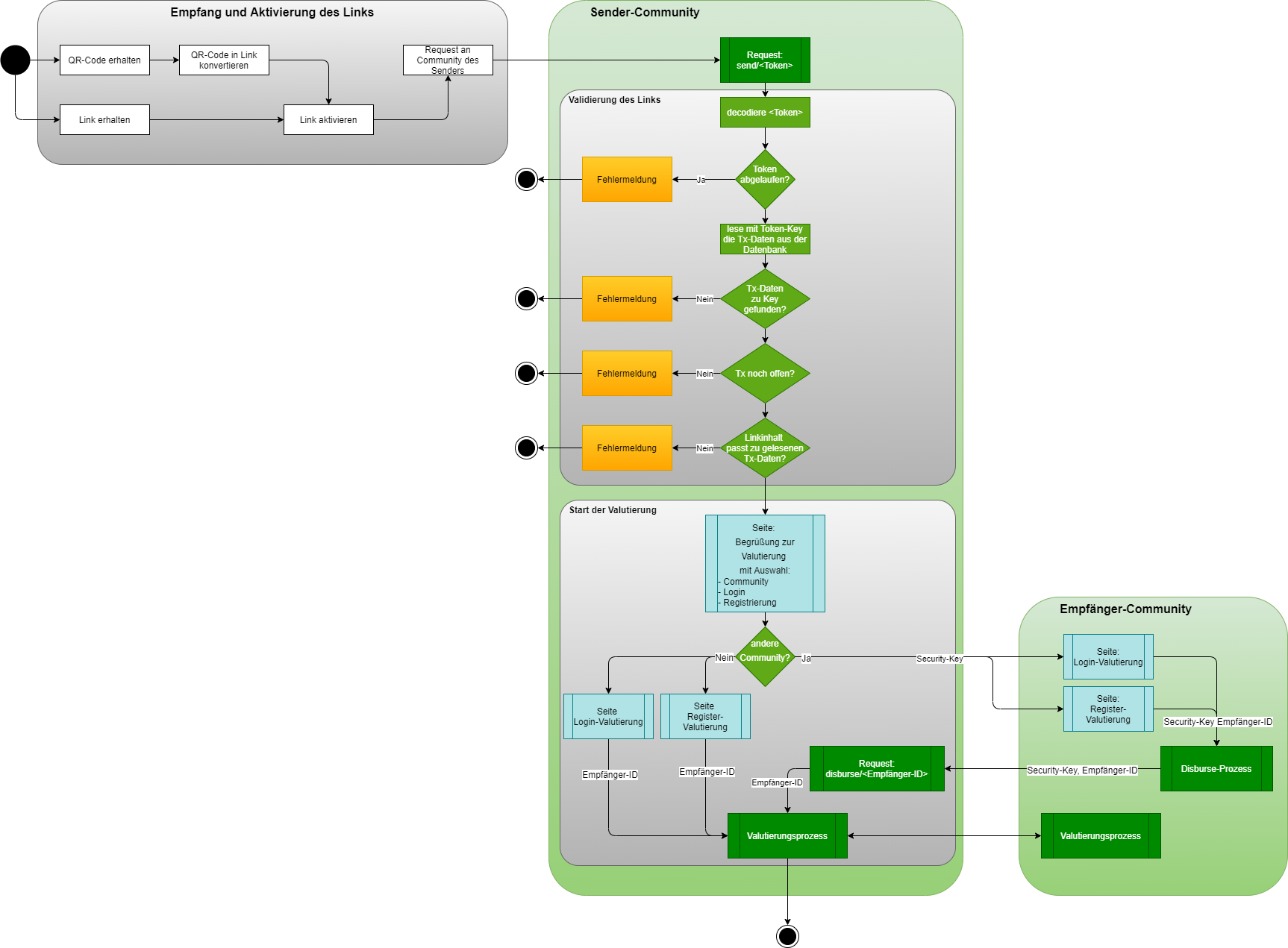
Redeem-Link Validation
After a user has created a redeem-Link to send an other user an amount of gradidos the recipient of this link can activate it during the next 14 days after creation day. The redeem-link is build with several technical details following the pattern: community-url of sender-community/redeem/code
example: https://gdd.gradido.net/redeem/3a5839be29f1
In consequence of these technical details the transaction-link is created, the recipient will be routed on activation to the community of the sender.
With receiving a redeem-link request the payload of this link will be validated:
- If the code of this link exists in database
- If the associated transaction is still open and
- If the expiration time of the code is not exceeded
Only if all validation checks are successful the community will start the disbursement process with the 1st step to select the recipient's community.
Community-Selection on sender-side
In consequence the first shown page for the recipient-user must offer a community-selection to yield the decision for the recipient community.
The first page the user will see on activating the redeem-link looks like quite the following page:

To support a cross community redeem-link activation this page is extended with the possibility to select a receiver-community. An UI-component will present a list of all known, verified and authenticated communities the sender's home-community is connected over the federation. Per default the sender-community is selected, the register- and login-links are visible and the shown button to switch to the selected community is hidden.
Only if the user select a foreign community out of the community-list the switch-community-button is visible and both register- and login-links are hidden. This force the user to first switch to the receiver-community before he could login or register himself.
The backend offers for the initialization of the community-selection-list the graphql query:
CommunityResolver.authenticatedCommunities :Promise Community[]
returning only Community-Entities with a defined uuid and a given authenticatedAt Date by the following type definition:
Community {
  id: number
  foreign: boolean
  name: string
  description: string
  url: string
  creationDate: Date
  uuid: string
  authenticatedAt: Date
  gmsApiKey: string
}
With the selection of a community-entry from this list the dialog evaluats the foreign-flag of the selected community and shows or hide the community-switch-button and the login- and register-links as described above.
If the user doesn't change the default sender-community, the system goes on with the local login or registration page for a local redeem-link activation.
In case of the recipient community will be a foreign community, the system has to prepare a request with a Disbursement-JWT-Token as parameter to invoke on the foreign community the disbursement process by following the pattern: community-url of receiver-community/redeem/<Disbursement-JWT-Token
Disbursement JWT-Token
This Disbursement-JWT-Token contains all necessary information to start a disbursement process on the foreign community. The payload of this token contains:
- type of JWT-Token - here
redeem-activation - the community-uuid of the sender-community
- the gradidoID of the sender
- the original code of the redeem-link
- the alias if exists or the firstname of the sender
- the amount of gradidos the sender will send
- and the memo
Disbursement-Process on receiver-side
On receiving a redeem-link request with a <Disbursement-JWT-Token> the receiving community will show the following page with content from the <Disbursement-JWT-Token>.
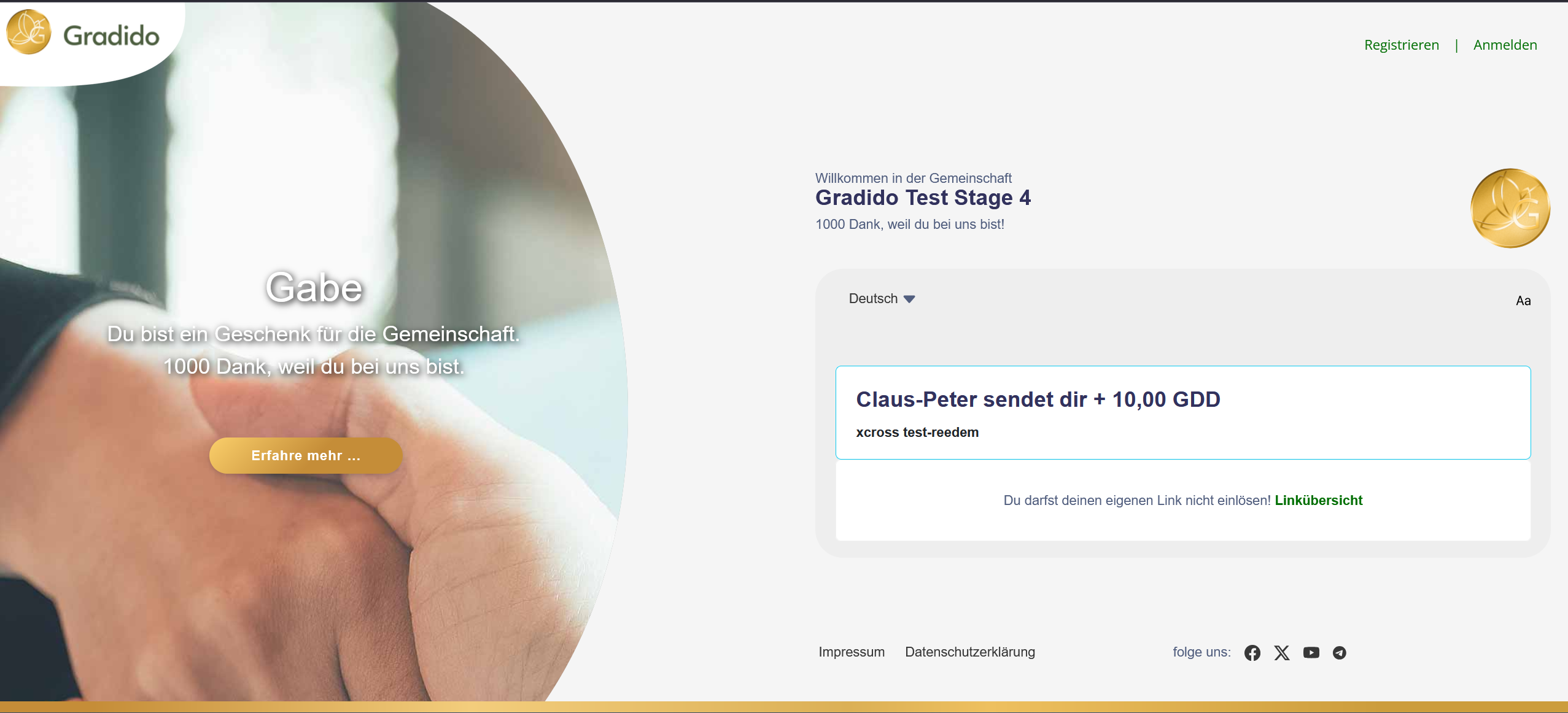
There exists no additional community-selection component, as it is shown on the sender-community before - see chapter Community-Selection on sender-side above.
After the user finished the login or registration on the receiver-community successfully, the receiver-gradidoID for the disbursement transaction is known. To process the disbursement process the backend offers the graphql query:
TransactionLinkResolver.disburse { jwt-token } :Promise boolean
with the disbursement-jwt-token as parameter and returns true in case of successful invocation, otherwise false.
The backend of the receiver-community will prepare the parameters for a disbures-request invocation against the sender-community-backend-api. The following values and attributes are necessary to transfer back to sender for dibursement:
- endpoint url of sender-community, necessary for disburse-request-invocation
- receiver-community uuid, part of the jwt-token
- receiver gradidoID, part of the jwt-token
- original redeem-code, part of the jwt-token
Disburse-Request on sender-side
The backend of the sender-community offers a disburse-api endpoint to process the disbursement-process of the receiver-community. On receiving the disburse-request on the sender-community the given jwt-token is decoded to get the readable attributes. At first the redeem-code is evaluated with the following rules:
- If the redeem-code exists in database
- If the associated transaction is still open and
- If the expiration time of the redeem-code is not exceeded
Only if all validation checks are successful the community will go on with the valutation-step of the disbursement process.
Valutierungsprozess
The details about the valutation-process-step are described in the document UseCase Send-Users-Gradido in chapter Valutierungsprozess.