 29c5c64c4e
I made a mistake. The correct external IP address is visible on your
Digital Ocean dashboard, not the kubernetes dashboard.
2.3 KiB
Setup Ingress and HTTPS
Follow this quick start guide and install certmanager via helm and tiller:
$ kubectl create serviceaccount tiller --namespace=kube-system
$ kubectl create clusterrolebinding tiller-admin --serviceaccount=kube-system:tiller --clusterrole=cluster-admin
$ helm init --service-account=tiller
$ helm repo update
$ helm install stable/nginx-ingress
$ kubectl apply -f https://raw.githubusercontent.com/jetstack/cert-manager/release-0.6/deploy/manifests/00-crds.yaml
$ helm install --name cert-manager --namespace cert-manager stable/cert-manager
Create Letsencrypt Issuers and Ingress Services
Copy the configuration templates and change the file according to your needs.
# in folder deployment/digital-ocean/https/
cp templates/issuer.template.yaml ./issuer.yaml
cp templates/ingress.template.yaml ./ingress.yaml
At least, change email addresses in issuer.yaml. For sure you also want
to change the domain name in ingress.yaml.
Once you are done, apply the configuration:
# in folder deployment/digital-ocean/https/
$ kubectl apply -f .
By now, your cluster should have a load balancer assigned with an external IP address. On Digital Ocean, this is how it should look like:
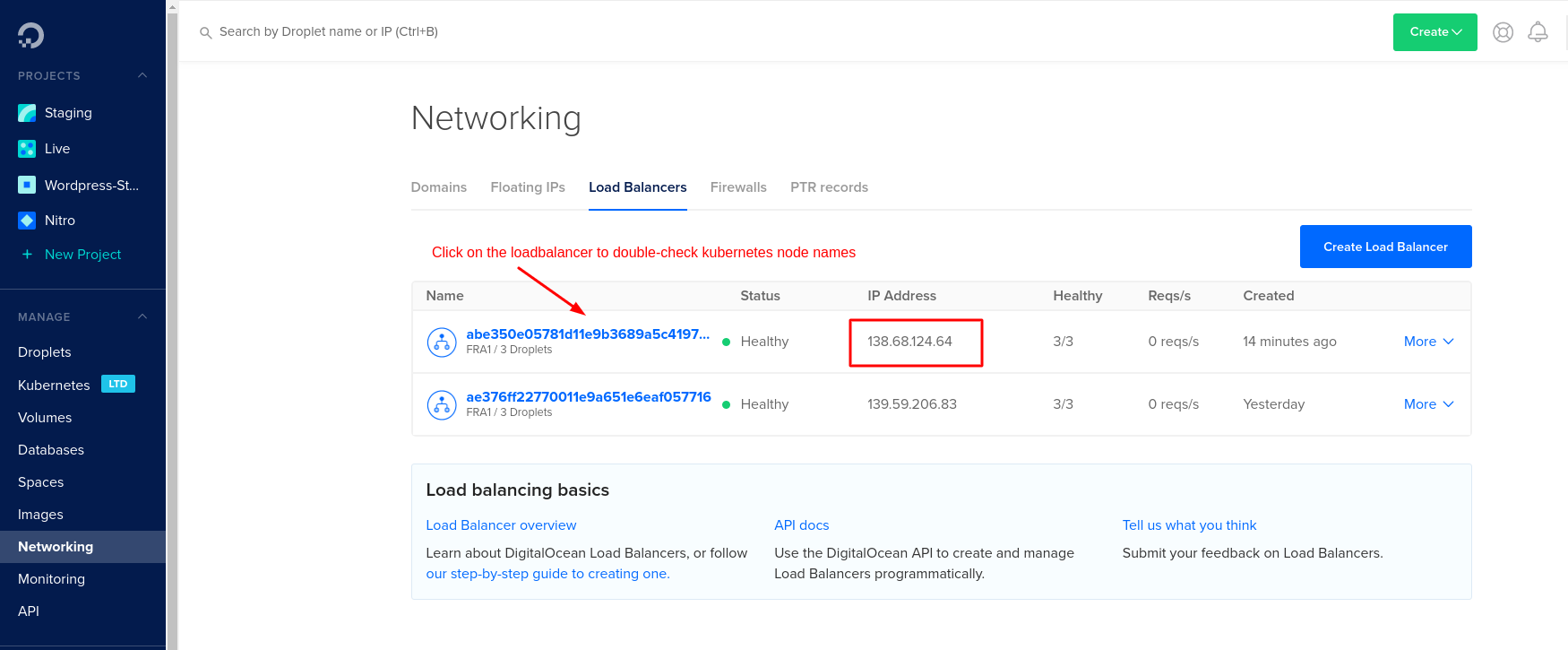
Check the ingress server is working correctly:
$ curl -kivL -H 'Host: <DOMAIN_NAME>' 'https://<IP_ADDRESS>'
If the response looks good, configure your domain registrar for the new IP address and the domain.
Now let's get a valid HTTPS certificate. According to the tutorial above, check your tls certificate for staging:
$ kubectl describe --namespace=human-connection certificate tls
$ kubectl describe --namespace=human-connection secret tls
If everything looks good, update the issuer of your ingress. Change the annotation certmanager.k8s.io/issuer from letsencrypt-staging to letsencrypt-prod in your ingress configuration in ingress.yaml.
# in folder deployment/digital-ocean/https/
$ kubectl apply -f ingress.yaml
Delete the former secret to force a refresh:
$ kubectl --namespace=human-connection delete secret tls
Now, HTTPS should be configured on your domain. Congrats.